
Rota Builder — Plan the week in minutes, not afternoons
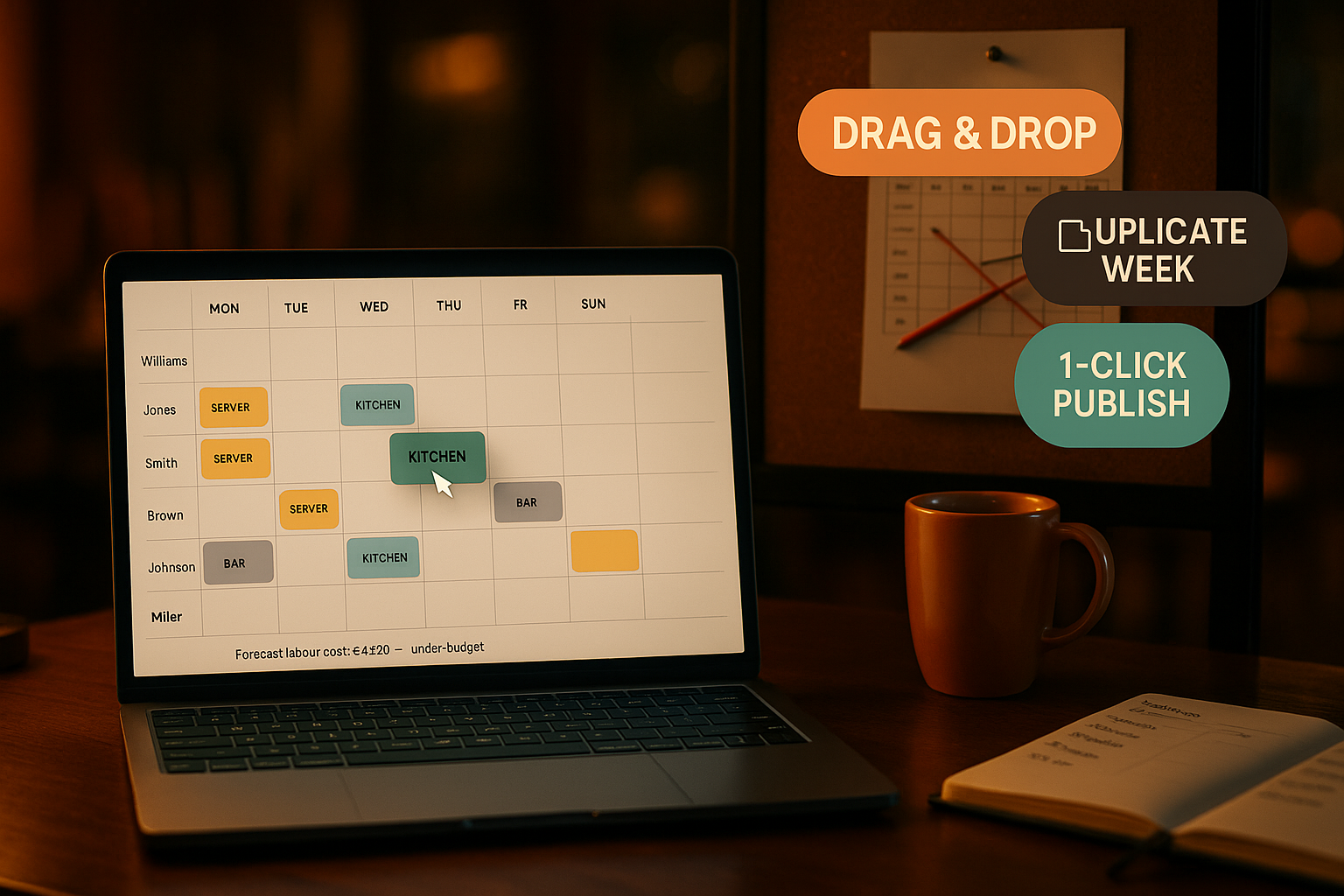
Drag-and-drop weekly schedule for the whole team. Copy last week to next week with one click, approve time-off requests inline, and let staff claim open shifts from their phone.
What is the Rota Builder?
The Rota Builder is the scheduling layer of the Ordering.Tools Staff module. Open it to see every staff member's shifts for the week on one drag-and-drop grid: who's working when, what role they cover, which floor section they own. Click an empty cell to add a shift in 5 seconds; click a filled cell to swap, edit, or cancel it. The grid is keyboard-navigable, mobile-friendly on a tablet, and saves every change with an audit trail.
Most managers don't think in 'templates' — they think 'copy last week, tweak Friday'. So the Rota Builder is template-free by design. Hit Copy from last week and the grid duplicates SCHEDULED + CONFIRMED shifts to the next week, skipping any conflicts with the (staff, date, start time) unique key. Tweak the changes, hit Publish, done. Time-off requests show up in the inbox with the affected shifts inline — approve and clashing shifts auto-cancel atomically.
Why managers stop dreading rota day
Copy last week, edit, publish
The fastest way to plan next week is to plan it like last week. One button materialises a full duplicate; a few drags adjust for time-off and the new patio cover; publish in under 4 minutes for a 30-staff venue.
Time-off requests in line of sight
Requests don't sit in a separate inbox you forget to open. They surface on the rota grid for the dates they cover, with one-click Approve and auto-cancel of clashing shifts in the same transaction.
Open shifts staff can claim
Anna calls in sick at 5 PM. Post the slot as an open shift, set who can see it (everyone / by role / by invite), and the first staff member to claim wins — a SQL-level guard makes double-claim impossible.
Live on every device
Every change broadcasts to every connected device. Your team's mobile My Shifts screen reflects the new rota the moment you publish — no Slack message, no 'did you see the new schedule?' phone calls.
How the Rota Builder works
Open this week's grid
Each row is a staff member, each column is a day of the week. Empty cells are open slots; filled cells show role, time, and section colour. The grid loads in under 1.5 seconds for a 4-week × 30-staff window.
Click Copy from last week
Pulls SCHEDULED and CONFIRMED shifts from the previous Monday-to-Sunday into the same days of the week you're viewing. The result toast shows how many shifts were copied and how many were skipped due to conflicts.
Tweak the differences
Drag a shift from Friday to Saturday. Click an empty cell to add a new slot. Right-click a shift to delete or swap with another. Every change writes to the StaffAuditLog with the actor and before/after snapshot.
Approve time-off, publish
PENDING time-off requests show up at the top of the rota with affected shifts highlighted. Approve a request — the clashing shifts auto-cancel in the same transaction and the requesting staff member gets an email + push.
Rota Builder — feature deep-dive
Drag-and-drop week grid
The grid is the rota — no separate template editor. Every shift is a real, scheduled StaffShiftAssignment row, not a 'planned' state that needs publishing later. Drag to move, click to edit, right-click to delete.
- Renders 4-week × 30-staff in p95 < 1.5 seconds
- Keyboard navigation across days and staff rows
- Color-coded by floor section for fast visual scanning
- Conflicts (overlapping start times for the same staff) prevented at the unique-key level
Copy from last week
One button duplicates the previous week's published rota into the next, skipping conflicts. Optional userIds filter so you can copy just one team's pattern without disturbing others. Every duplicate writes a StaffAuditLog row with copied/skipped counts.
- Skips collisions with the (venue, user, date, startTime) unique key — no overwrites
- Optional userIds filter for selective duplication
- Result toast tells you how many shifts were copied vs skipped
- Audit row records the source week, destination week, and the actor
Time-off inbox with auto-cancel
Time-off requests carry a type (vacation / sick / personal / unpaid / parental), a date range, optional partial-day window, and an optional sick-note attachment URL. Approval is one click; clashing shifts auto-cancel in the same $transaction.
- Vacation, sick, personal, unpaid, parental request types
- Partial-day windows — only shifts whose time overlaps the request are cancelled
- Atomic approve + cancel: never half-applied
- Email + web-push notification to the requester on every decision
Open shift marketplace
Post a slot when you need cover; staff claim from their phone; you approve one. The OpenShift status guard at the SQL level makes the race impossible to lose: only one approval succeeds, others see 409 immediately.
- Visibility: ALL · ROLE · INVITED — match the slot to the right pool of staff
- Atomic OPEN→CLAIMED guard via prisma.openShift.updateMany
- Approving a claim materialises a CONFIRMED StaffShiftAssignment for the winner
- Other pending claims auto-reject in the same transaction
Where the Rota Builder makes the difference
30-staff weekly planning under 4 minutes
Open the grid Monday morning. Hit Copy from last week. Adjust 6 cells for the catering event Friday and Anna's vacation. Publish. Total time: 3:42. The previous spreadsheet workflow took 90 minutes.
Anna calls in sick at 5 PM
Cancel her shift in the rota grid (one click), post an OpenShift with a 17:30 expiry. Three waiters see it, two claim within 4 minutes, you approve the one with seniority. Done in under 5 minutes — no group-chat scramble.
Maria's vacation request, 2 weeks out
Maria submits a 7-day VACATION request from her phone. It surfaces in your inbox with the 5 affected shifts highlighted. You approve — clashing shifts auto-cancel and surface as gaps in the rota grid for you to fill via OpenShift posts.
Mid-shift swap with the kitchen team
Petar (server) and Ivan (host) decide to swap shifts. Manager opens the rota grid, picks both shifts, hits Swap — both originals cancel, both new SWAP-source rows are created with full lineage, no double-booking ever.
Multi-venue manager covering 3 locations
Switch venues from the AdminShell venue picker; the same rota interface appears for the new venue with its own staff, sections, and shifts. No mental context switch — every venue uses the same grid, the same flows.
Staff plan their own week
Waiters open My Shifts on their phone (under /admin/profile/shifts), see the upcoming 60 days at a glance, claim open shifts that match their availability, and submit time-off requests for periods they need off — without ever calling the manager.
Rota planning that respects how managers actually think
Most rota tools force you into an abstraction first: build a template, save it, apply it to next week, edit overrides, publish. That's three steps for a problem that has one shape — most weeks are 90% the same as last week. The Rota Builder skips the template entirely. The rota IS the data; copying the rota IS the template; tweaking and publishing is one continuous gesture instead of three discrete ones.
Why drag-and-drop beats forms for shift planning
A typical shift change is 3 mouse drags: Anna swaps with Maria on Friday; Petar takes Saturday's open slot; the new hire joins the lunch rush. Forms force you to retype role, date, and time for each change. Drag-and-drop changes the time component (drag column) and the staff component (drag row) simultaneously — one gesture, two changes, sub-second feedback. Over a week of edits the time savings compound: forms take 90 minutes, drag-and-drop takes 4.
Time-off and rota are one workflow, not two
Most platforms ship time-off as a separate inbox, hidden behind a tab. Managers forget to check it; pending requests pile up; clashing shifts ship to staff who are already on holiday. The Rota Builder surfaces every PENDING request on the same screen as the shifts it would cancel. You see the trade-off in real time: approve, the clashing shifts disappear; reject, the staff member gets the rejection email and the rota is unchanged. One workflow, one screen, no missed requests.
Open shifts close the gap between 'someone is sick' and 'someone is covering'
Sick-day cover is the highest-friction moment in restaurant scheduling. The Rota Builder makes the gap visible in the grid (the cancelled shift becomes a hole) and lets you post an OpenShift in 4 clicks; staff claim from their phone; you approve. The race-condition handling is at the SQL level — `prisma.openShift.updateMany({ where: { id, status: 'OPEN' }, data: { status: 'CLAIMED' } })` — so even with three claimants pressing the button at once, exactly one wins. This is the same atomic-guard pattern we use for the Bill table-occupancy invariant.
Stop dreading rota day
Open the grid, copy last week, tweak, publish. Manage time-off and open shifts from the same screen. Premium feature, available now.
Related features
Other tools restaurants use alongside this one.
Open a tip pool for a period, define percentage splits per role (60% servers / 30% kitchen / 10% bar), and the platform distributes the total across staff in proportion to their clocked hours in each role. One transaction, one audit row, zero spreadsheets.
Learn morePer-staff dashboards with orders served, average ticket, on-time rate, voided items, and customer feedback — rolled up nightly from your live order data, not from a separate POS export.
Learn moreCompliant report generation for Bulgarian employers — pull hours from clock events, apply the year's official insurance and tax rates, and download files ready for the NRA portal and your bank.
Learn moreUpload once, get notified before they expire. Manager-uploaded only (anti social-engineering); staff see their own copies on their phone; expiry watcher pages you 30/14/3 days out.
Learn more